


UNC Health
4.388.00 Reviews
App Specs
- Version
- 3.11.0
- Updated On
- License
- Free
- Downloads
- 100,000+
- Developer
- UNC Health Care
- Categories
- Medical
- Platform
- Android
Screenshots
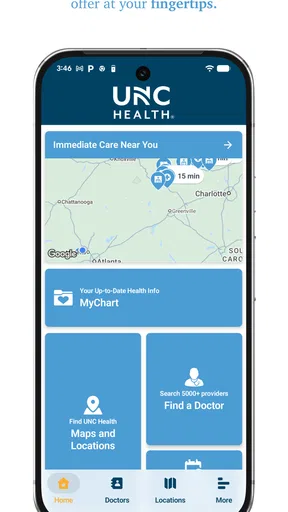
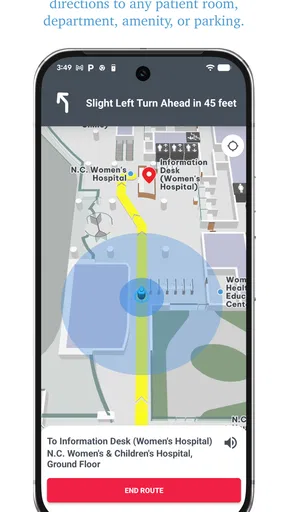
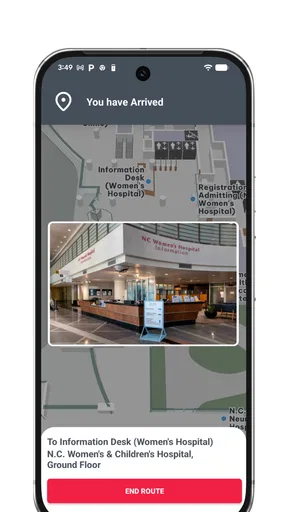
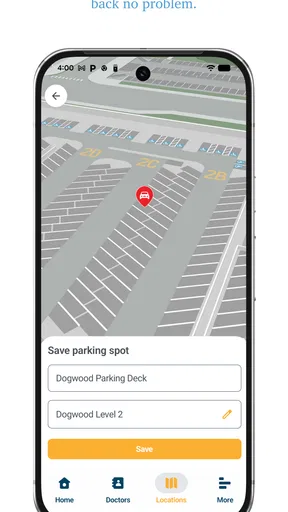
 Analysis by AppCompare
When I need healthcare information, I usually want to get to the right place or service without making another phone call. UNC Health is built around that practical need. It is a free medical app from UNC Health Care that brings wayfinding, appointment-related tasks, and virtual urgent care into one mobile experience. After spending time with it, I see its main value less as a replacement for every healthcare tool and more as a focused companion for people who already use UNC Health services.
The app has a clear advantage over relying on a hospital website, a general map app, and a separate video-care service at the same time. Its usefulness comes from keeping healthcare-related actions together. That said, the experience depends heavily on your relationship with UNC Health. If you rarely visit its facilities or do not use its services, the app may feel more specialized than necessary.
How UNC Health feels in everyday use
I find the everyday value of UNC Health depends less on how many tools it gathers and more on whether I can use it before a rushed moment begins. In this section, I focus on the small habits that make a provider-specific app easier to rely on, while keeping expectations realistic. That leads into the practical question of how its main tasks feel when time and attention are limited.
Speed expectations before an appointment
My first impression is that UNC Health is designed for quick, purposeful sessions rather than long browsing. I would open it when I need to check where I am going, manage a healthcare task, or look for an urgent-care option. That makes the app feel more like a digital front desk than a general health dashboard.
The wayfinding element is especially useful when a healthcare visit involves a large or unfamiliar facility. A normal map app can get me to a campus, but it does not necessarily answer the more important question: where should I go once I arrive? Having navigation connected to the healthcare organization can reduce that last-minute uncertainty. I would still check the appointment details carefully, but the app is better suited to the full visit than a standard street-navigation tool.
Scheduling is another area where speed matters. A healthcare app should help me move from intention to action without making me search through unrelated pages. UNC Health’s focus gives it a more direct purpose than a broad medical-information app. I would expect the quickest experience when I already know which service I need and have the relevant details ready.
Virtual urgent care can also save time in the right situation. It is appealing when I need professional attention for a non-emergency concern and would rather begin remotely than travel immediately. I would not treat it as a substitute for emergency services, and I would not use it to delay care for serious symptoms. Its value is in reducing unnecessary trips when a remote consultation is appropriate.
Worth Reading Before You Choose

EA SPORTS FC Mobile 26 Is a Bigger Football Game, but It Takes Time

Flipboard Shows What News Apps Must Do Beyond the Feed

Switching to Android Auto Means Rethinking Your Driving Routine

Google Calendar Makes a Crowded Week Easier to Manage

Ludo King Makes the Most of the Minutes Between Plans

Baby Panda World Brings Quick Play to Modern Phones, but Its Game Library Feels Busy
What happens during heavier-use moments
The most demanding moments are likely to be practical rather than technical: preparing for an appointment, trying to find a location while already on a medical campus, or attempting to arrange care when I am not feeling well. In those situations, small points of friction matter more than visual polish. Clear labels, predictable navigation, and short paths to the relevant action are more important than extra customization.
I found that the app makes the most sense when I use it before the stressful moment. Looking up a facility or reviewing the route ahead of time is easier than trying to learn the interface while parked outside a hospital. My useful habit would be to open the app before leaving, identify the destination, and save enough mental context to avoid depending on a rushed search at arrival.
For virtual urgent care, preparation also affects the experience. I would have my symptoms, medication information, and questions ready before starting. That is not a special feature of this app, but it is an important trade-off: the app may make access more convenient, while the quality of the visit still depends on how prepared I am and whether remote care fits the problem.
Scheduling can become more complicated when I am comparing services, coordinating care for another person, or changing plans. This is where a dedicated healthcare app may not feel as effortless as a simple calendar app. A calendar is excellent for reminders, but it cannot replace the healthcare context. UNC Health is more useful for the appointment process itself, while my calendar remains better for keeping the commitment visible alongside work and family plans.
Reliability and recovery when plans change
For me, reliability in a medical app is not only about whether it opens. It is also about whether I can recover when I make a wrong choice, lose track of a location, or need to return to a task later. UNC Health’s focused design gives it a sensible role in those situations, because the key actions are connected to one healthcare provider rather than scattered across unrelated services.
I would still avoid treating the app as my only source of critical information. For an important visit, I would keep the appointment details available through another channel as well, especially if travel, timing, or preparation requirements matter. That is not a criticism unique to UNC Health; mobile access can fail at inconvenient times, and medical decisions should not depend on a single interface.
The app’s recovery value is strongest when I use it as a starting point. If I am unsure where to go, I can begin with wayfinding. If I need care but am unsure whether a visit is necessary, virtual urgent care may offer a more suitable first step when available for my situation. If I need to arrange a visit, scheduling gives me a direct route. These paths create a useful fallback pattern instead of forcing every problem into one feature.
There is also a human factor. People often use healthcare apps while distracted, uncomfortable, or worried. I appreciate tools that reduce the number of decisions I need to make. UNC Health cannot remove the uncertainty of a medical issue, but it can make the administrative side feel more manageable. That is the kind of reliability I value most here.
Device constraints and practical trade-offs
The app is available for users whose device meets its stated minimum operating-system requirement of version 10. That makes checking compatibility an important first step, particularly for anyone using an older phone. A healthcare app that cannot be installed or updated is not useful when an appointment becomes urgent, so I would verify the device before depending on it.
On a capable, reasonably current phone, I would expect the app to be a modest part of my mobile routine rather than something that demands constant attention. Its purpose is task-based: open it, complete a healthcare action, and close it. That is preferable to an app that encourages unnecessary browsing, especially in a medical context.
Older devices may present a different experience. Even when an app technically supports a phone, limited storage, an outdated system, or a crowded background workload can make any healthcare tool feel slower. I would keep enough free space for updates and avoid waiting until the day of an appointment to discover that the app needs maintenance.
Connectivity is another practical consideration. Wayfinding and remote care are most valuable when the phone has a dependable connection. I would not assume that every part of a hospital or clinic will offer equally strong service, so preparing the route before entering a large building is sensible. For virtual urgent care, a stable connection and a quiet setting are more important than squeezing the consultation into a poor signal area.
These constraints do not make UNC Health demanding, but they do shape how I would use it. It works best as one part of a prepared healthcare routine, not as a magical solution that removes every logistical problem.
Who gets the most value from it
I would recommend UNC Health most readily to people who regularly interact with UNC Health Care. Patients with recurring appointments, visitors who need help navigating a medical campus, and people who appreciate having scheduling and remote urgent-care access in one place are the natural audience.
It can also help family members who assist someone else with healthcare logistics. A relative arranging visits or helping with directions may find a provider-specific app easier to understand than a collection of general tools. The important distinction is that the app is valuable because it is tied to UNC Health, not because every healthcare need belongs inside one application.
For someone who only wants general symptom information, medication reminders, fitness tracking, or a broad record-management tool, I would choose a different category of app. UNC Health is not the right fit simply because it is labeled medical. Its strength is the connection between a patient and a particular healthcare network.
I would also be cautious about recommending it as the sole option for someone who needs emergency guidance. Virtual urgent care is convenient for suitable non-emergency situations, but serious or rapidly worsening symptoms call for immediate professional help through the appropriate emergency channel. The app should support sensible care decisions, not become a reason to postpone them.
Three workflows that make it more useful
Prepare the visit before travel. I would use the wayfinding tools in advance, not only after arriving. This turns the app from a panic button into a planning tool and gives me a better chance of finding the correct destination without circling a large campus.
Separate access from diagnosis. When I consider virtual urgent care, I would use it to reach care conveniently, not to self-diagnose. Writing down symptoms and questions first makes the remote interaction more productive and helps me recognize when the situation is outside the app’s sensible role.
Pair healthcare scheduling with a personal calendar. The app can help with the healthcare task, while a normal calendar can protect the time around it. I would add travel time, preparation, and recovery time separately rather than assuming the appointment itself is the whole commitment.
These workflows reveal a useful trade-off. The app is not necessarily a complete personal health organizer, but it can be a strong operational tool when I use it at the right stage: before travel, before a remote visit, and immediately after arranging care.
How it compares with the usual alternatives
A hospital website may offer more information in a single place, but a mobile app is easier to reach when I am already holding my phone and need a specific action. A general map application may provide excellent road directions, yet it does not have the same healthcare context for navigating a facility. A standalone video-care service might serve a wider range of providers, but it may not connect as naturally to UNC Health-related tasks.
The trade-off is breadth. General-purpose tools are often more flexible across hospitals, doctors, and everyday planning. UNC Health is narrower, but that narrowness can make it more useful for a patient whose care is already centered on UNC Health Care. I would choose the provider app for organization-specific tasks and keep broader tools for everything outside that relationship.
This also explains why the app may not feel essential to every user. If I change providers often, live far from UNC Health facilities, or prefer handling appointments by phone, the extra app may not earn a permanent place on my device. If I repeatedly need the same network’s locations and services, the convenience becomes much easier to justify.
What the app’s track record suggests
UNC Health has been available since September 10, 2019, and its current version is 3.11.0. That history suggests an established product rather than a newly released experiment. I also see a meaningful user base, with over one hundred thousand installs, alongside an average rating of 4.3 from around 287 ratings. Those figures do not guarantee that every patient will have the same experience, but they provide useful context: the app has had time to mature and has attracted regular use.
The rating should be read with the right expectations. Healthcare apps are judged through stressful, personal situations, and satisfaction can depend on appointment availability, account details, facility complexity, or the user’s immediate need. A solid average is encouraging, but it is not a promise that every workflow will be frictionless.
I also like that the app is free and rated for Everyone. That lowers the barrier to trying it, particularly for families who may need a straightforward healthcare access tool. Free access does not remove the need to consider device compatibility or whether UNC Health is actually relevant to my care, but it makes testing the app a low-risk decision.
My performance verdict
After looking at it as a daily healthcare utility, I see UNC Health as a focused and sensible choice for patients connected to UNC Health Care. Its perceived speed comes from keeping the main actions close together, while its strongest performance advantage is reducing the number of separate tools I need during a healthcare visit. Wayfinding, scheduling, and virtual urgent care address different moments in the same broader journey.
Its limitations are equally clear. It is not a universal medical assistant, it cannot replace emergency care, and it may be unnecessary for people who do not use UNC Health services. Older devices and weak connectivity can also undermine the experience at exactly the wrong time, so I would prepare important visits rather than depend on last-minute access.
My recommendation is straightforward: install it if UNC Health is part of your regular care, then use it proactively before appointments rather than waiting for confusion to appear. For those users, the app’s specialized focus is a strength. For everyone else, a general healthcare or navigation option may be a better match. As a free medical app from UNC Health Care, UNC Health earns its place through practical access and organization, not through trying to do everything.
Pros
- Easy access to UNC Health appointments
- providers
- and locations
- Secure messaging helps patients communicate with their care team
- Prescription tools make medication management more convenient
- Health records can be viewed without calling the office
- Useful health resources support informed care decisions
Cons
- Some features may require an active UNC Health patient account
- Appointment availability depends on the selected provider and location
- Certain records or services may not appear immediately
- The app is most useful for patients within the UNC Health network
- Notifications may need manual setup to receive timely reminders
FAQs for UNC Health
What is the UNC Health app used for?
The UNC Health app is designed to help patients manage several healthcare tasks from a mobile device. Depending on your location and participating services, you may be able to find providers, schedule or request appointments, review parts of your medical record, check test results, view medications, receive messages, and access billing information. Available features can vary by facility, account type, and current UNC Health services.
How do I sign in to UNC Health?
To use personalized features, you generally need to sign in with your My UNC Chart account credentials. New users may be able to create an account through the app using the requested identity and patient information, while existing users can log in directly. If you forget your password or have trouble verifying your identity, use the recovery options or contact UNC Health support rather than creating multiple accounts.
Can I schedule appointments and communicate with my doctor?
The app may allow eligible patients to search for providers, request or schedule certain appointments, and send secure messages to participating care teams. However, not every appointment type or department supports online scheduling, and response times for messages are not intended for emergencies. For urgent symptoms, call the appropriate emergency number or seek immediate medical attention instead of waiting for an in-app reply.
Can I view test results, prescriptions, and medical records in the app?
UNC Health may provide access to portions of your electronic health record, including laboratory results, visit summaries, medications, immunizations, and other clinical information. The timing and amount of information shown can differ by test, provider, and facility. Some results may appear automatically before your clinician has discussed them with you, so contact your care team if you need help understanding anything displayed.
Is the UNC Health app free and safe to use?
The app is generally available to download without a separate purchase, although normal mobile data charges may apply and healthcare services themselves may involve insurance or other costs. It uses account authentication and secure connections to help protect personal health information, but you should still use a strong password, enable device security, avoid public Wi-Fi when possible, and keep the app and operating system updated.


